How to keep the same face in every AI photo and video
Why AI faces drift and how to stop it: a strong reference set, fixed identity words, the right model for each job, framing and light rules, video tips and a drift checklist.
Every AI persona account hits the same wall. The first ten images look like one person. By image forty, the jaw is softer, the eyes have moved, and followers start asking whether it is a different model. This guide explains why faces drift and the habits that keep one face stable across hundreds of photos and videos.
If you have not built your persona yet, start with how to create an AI persona and come back here once you have picked a face.
Why faces drift
An image model does not remember your persona. Each generation is a fresh guess, and the face changes whenever the guess has room to move. The most common causes:
- Text-only prompts. A description like "brown hair, green eyes, 27" fits millions of faces. Without a picture, the model picks a new one each time.
- Changing the identity words. "Warm smile" in one prompt and "confident look" in the next can change the face, not only the expression.
- Extreme angles and small faces. A face seen from below, in profile, or only a few pixels wide gives the model little to match.
- Style words. "Cinematic", "editorial", "anime", "oil painting" and strong filters reshape features.
- Copies of copies. Using a slightly drifted output as the next reference makes every error permanent.
The fix is not one trick. It is a small system that removes room for guessing.
Build a reference set that does the work
The reference set is the persona's passport. Every photo and video request carries it, so it is worth an hour of care.
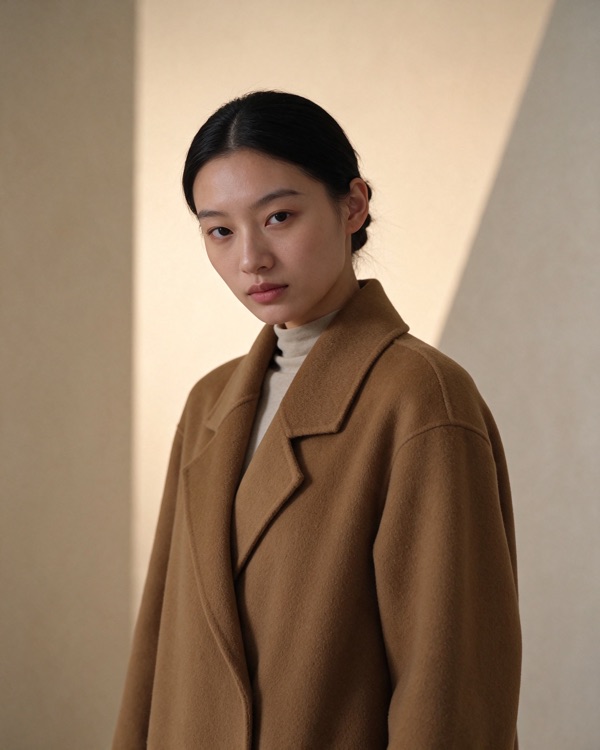
Make five to eight images from the face you chose:
| Image | Why it matters |
|---|---|
| Front, neutral expression | The anchor. Compare every new image against this one. |
| Three-quarter left and right | Teaches the shape of the nose, cheekbones and jaw. |
| Profile | Keeps side views from becoming a different person. |
| Smiling | Smiles change the face the most; give the model a real example. |
| Full body | Locks height, build and proportions for wide shots. |
| Hair up and hair down (optional) | Lets you change hairstyles without changing the face. |
Rules for the set itself:
- Soft, even light and a plain background. Hard shadows and busy scenes hide the features you want copied.
- Same age, same makeup level, same hair colour in every image.
- No sunglasses, hats or hands near the face.
- High resolution, face clearly visible. A blurry reference produces a blurry identity.
Store the set in one "canon" folder and never replace an image with a generated output unless it matches the front reference better than the original.
Create your persona's reference set on Reelina
Fix the identity words
Write one identity line and paste it unchanged into every prompt. Put everything else (place, outfit, mood) after it.
Identity (never change): 27-year-old woman, sleek black hair in a low bun,
light olive skin, soft almond eyes, small beauty mark above the right lip,
slim build.
Keep it specific and physical. Distinctive, stable details help the most: a beauty mark, a freckle pattern, a hair parting, a gap in the teeth. Avoid words that describe a feeling (stunning, fierce, sultry); they move the face around.
When you want a new look, change the outfit, hair styling or makeup line, never the identity line. "Hair in loose waves today" is safe; rewriting the hair colour is not.
Use the right model for each job
Different model types hold identity in different ways:
- Reference or edit models take your reference images as input. Use them for almost every persona photo.
- Text-to-image models only read words. Use them for faceless shots: a coffee cup, a hotel room, a sunset the persona "took".
- Reference-to-video and image-to-video models carry the face into motion. Start from your best photo of the scene rather than from text.
Stick to one main model for the persona's photos. Switching models between posts is one of the fastest ways to get a slightly different person.
Framing and light rules
- Keep the face large enough. Waist-up and closer is the safe zone. For wide shots, generate a closer version first and use it as an extra reference.
- Avoid extreme angles. Slight high or low angles are fine; worm's-eye and top-down shots are where faces break.
- One light recipe per place. If the home gym is always morning window light, the face stays consistent there too.
- Go easy on grading. Add colour and film looks in editing, not in the prompt.
Keep the face in video
Video gives drift more chances, because the face moves between frames. What helps:
- Start from a photo. Generate the scene as a still, check the face, then animate that still.
- Short shots. Five seconds per shot, one action per shot. Long clips wander.
- Slow head movement. Fast turns and big laughs are where identity slips. Save them for the end of a shot.
- Same references for every shot, and the same outfit line.
- Talking videos: write the script, make the voice, then generate the talking shot from a front-facing still.
Check every image before you post
Put each new image next to the front reference and run through this list:
- Eye shape and spacing match.
- Nose bridge and tip match.
- Jawline and chin match; the face is not wider or narrower.
- The distinctive mark is there and on the correct side.
- Skin tone matches under similar light.
- Apparent age is the same.
If two items fail, regenerate rather than fix it in editing. A feed with ten consistent images beats one with thirty that almost match.
When the face has already drifted
- Go back to the canon folder and regenerate from the original references, not from recent posts.
- Re-check the identity line for words that crept in over time.
- If one angle keeps failing, make a new reference image for that angle from the front reference and add it to the set.
- Archive posts that clearly show a different person. Followers notice drift more than a short gap in posting.
Quick checklist
| Before you generate | After you generate |
|---|---|
| Reference set attached | Compared with the front reference |
| Identity line unchanged | Distinctive mark present |
| Face large in frame | Same apparent age |
| One light recipe for this place | Regenerated if two checks failed |
Next, put the face to work: browse ready-made scenes for your persona, or answer the one-minute persona quiz if you are still choosing a direction.