How to create an AI persona that looks the same in every post
A step-by-step guide to building a consistent AI persona (AI influencer): niche, persona bible, locked face, photo and video prompts, a posting plan and the platform rules.
An AI persona is a fictional person you design once and then use in every photo, video and caption. The hard part is not making one good image. It is making the hundredth image look like the same person, in a different place, outfit and light, without the face drifting. This guide walks through the process we use, from the first idea to a month of posts.
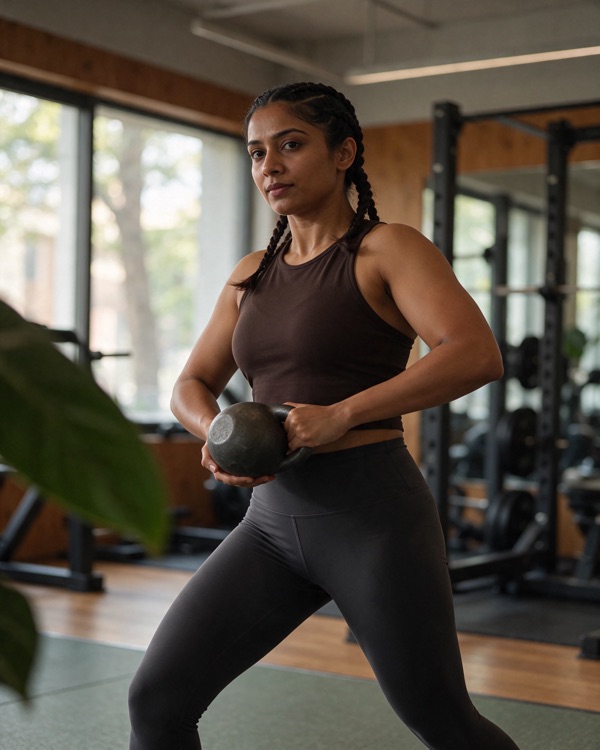
What you are building
A persona has three layers. Keep them separate and write each one down:
- Identity: the face, age range, build and the details that never change (hair colour, a freckle, a scar).
- Character: personality, values, how they talk, what they would never post.
- Content job: the niche, the formats and the audience the persona serves.
Two rules apply from day one. The persona is an adult and is fictional: never build a persona from a real person's photos without their permission, and never make it look like a known person.
Step 1: Give the persona a job
Start from the content, not the face. "A fitness coach who posts 20-minute home workouts for busy parents" gives you locations, outfits, poses and captions for months. "A pretty girl" gives you nothing to post on day four.
Answer three questions:
- Who watches, and what problem do they have?
- Which three formats will the persona repeat? (for example: a workout reel, a before/after carousel, a talking tip)
- Where does the persona live? A small set of recurring places makes the account feel real.
If you are not sure yet, take the one-minute persona quiz: it suggests a starting look and personality for your niche.
Step 2: Write a persona bible
The persona bible is a short document you paste into every generation. It is the single biggest reason some AI accounts look consistent and others do not.
Name: Nia
Age: 27
Look: high brown ponytail, warm tan skin, athletic toned build, small mole under the left eye
Style: muted sports sets, white sneakers, minimal gold jewellery
Personality: high energy, playful, encouraging; never shames anyone's body
Voice: short sentences, one emoji at most, ends with a question
Places: bright home gym, city park track, small apartment kitchen
Never: alcohol, diet pills, medical claims
Keep the Look line identical in every prompt. Change the scene, never the identity words.
Step 3: Generate the face and lock it
- Generate four to eight face candidates from the Look line. Ask for a neutral, front-facing portrait in soft daylight, so the face is not hidden by style.
- Pick one. Do not mix features from several candidates; that is where drift starts.
- Build a reference set from the chosen face: front, three-quarter left, three-quarter right, profile, and one full-body shot. These five images travel with every later request.
From here on, every photo and video is generated with the reference set attached, not from text alone. Text-only generations will slowly turn into a different person. The details are in how to keep the same face in every AI photo and video.
Build your persona's face and reference set on Reelina
Step 4: Photos that keep the identity
Write photo prompts in the same order every time: who, where, framing, light, wardrobe, mood. The reference images carry the face, so the prompt can spend its words on the scene.
The persona from the reference images, mid-workout in a bright home gym,
vertical 4:5 photo, waist-up, camera at chest height,
soft window light from the left, light morning haze,
sage-green sports set, white sneakers,
focused and smiling, natural skin texture, no text
Three habits keep a feed consistent:
- One light recipe per place. The home gym is always morning window light; the park is always golden hour.
- Same camera language. Pick one or two framings per format and repeat them.
- Check the face, not the vibe. Compare each new image with the front reference before you post it.
Step 5: From photo to video
Short clips work best when each shot does one thing. Generate five-second shots and cut them together, instead of asking for one long video.
Shot 1 (setup, 5s): the persona walks into frame in the park track, ties her shoe, looks up at camera.
Shot 2 (action, 5s): side view, she starts a sprint, camera tracks at hip height.
Shot 3 (payoff, 5s): close-up, catching her breath, laughs and points at camera.
Vertical 9:16, handheld feel, golden hour, same outfit in every shot.
Give every shot the same reference set and repeat the outfit line. For talking videos, write the script first, generate the voice, then the talking shot, so lips and timing match.
Step 6: A posting plan you can keep
Consistency beats volume. A simple starting plan for one persona:
| Day | Format | Example |
|---|---|---|
| Mon | Reel (15–20s) | Three-move workout, one shot per move |
| Wed | Carousel | "What I eat on a training day", five photos |
| Fri | Talking tip | One mistake people make, 20 seconds |
| Sun | Story set | Behind the scenes in the persona's places |
Batch-produce a week at a time: one session for photos, one for video. Reuse the same places and outfits across the week so the account feels like one life, not random images.
Step 7: Platform rules and disclosure
- Label AI content. Instagram and Facebook show an "AI info" label, TikTok asks creators to label realistic AI-generated content, and YouTube requires disclosure for realistic synthetic media. Turn these on and say it in the bio as well, for example "AI persona, made with care".
- No real people. Do not upload someone else's photos to build a persona, and do not imitate celebrities or creators.
- Adults only. Personas are 18+ and must look it.
- Brand deals need the usual ad disclosure (#ad or the platform's paid partnership tag) on top of the AI label.
Common mistakes
- Changing the Look line "just a little" for a new scene. The face changes with it.
- Generating from text only after the face is chosen.
- Posting every style trend. One clear niche grows faster than a persona that is everything.
- Skipping the persona bible. Without it, captions and choices drift as much as the face.
Next steps
Pick a niche, write the persona bible and generate the face today. The rest of the guides in this series go deeper into each step: keeping the same face, prompt templates for photos, turning photos into video and running more than one persona.